1. 도입: 왜 직접 AI API를 연동하는가?
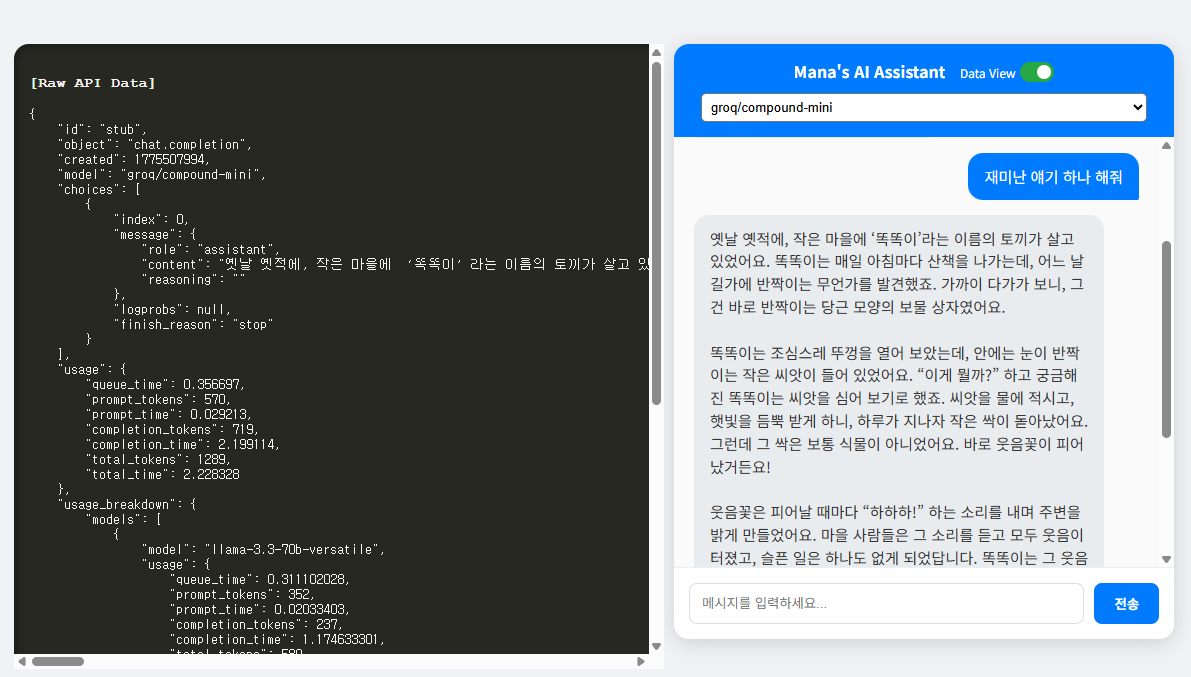
요즘은 웹사이트에서 직접 AI를 쓰는 시대입니다. 하지만 단순히 API 키만 넣고 “Hello”를 주고받는 수준을 넘어, **실제 서비스 수준의 UX(사용자 경험)**를 갖추려면 생각보다 챙길 것이 많습니다.
오늘은 제 블로그 **’Mana’s Lab’**의 AI 조수를 업그레이드하며 겪은 시행착오와 해결책을 공유합니다.
2. 핵심 해결책: 429 Resource Exhausted 에러 처리
무료 티어 API를 쓰다 보면 가장 자주 마주치는 것이 바로 **할당량 초과(429 에러)**입니다.
- 문제: 에러가 나면 화면에 아무 반응이 없거나 콘솔에만 찍혀 사용자가 답답해함.
- 해결: PHP에서 받은 에러 객체를 분석해 채팅창에 투명한 빨간색 배경의 전용 메시지를 띄우도록 커스텀 CSS를 적용했습니다.
이제 “잠시 후 다시 시도해 주세요”라는 안내가 시각적으로 명확하게 전달됩니다.
3. UX의 한 끗: Tab 키로 모델 광속 전환
여러 모델(Gemini 1.5, 2.5 등)을 테스트할 때 일일이 마우스로 콤보박스를 클릭하는 건 매우 번거로운 일입니다.
- 구현 기능: 입력창에서
Tab을 누르면 다음 모델,Shift + Tab을 누르면 이전 모델로 즉시 변경. - 디테일: *
e.preventDefault()로 포커스 이동 차단.setTimeout과clearTimeout을 조합해 2초간 입력창 placeholder에 현재 바뀐 모델명을 표시.setCookie를 연동해 새로고침 후에도 선택한 모델 유지.
이렇게 하면 키보드에서 손을 떼지 않고도 다양한 모델의 성능을 즉시 비교해 볼 수 있습니다.
4. 청각적 디테일: TTS(음성 합성) 최적화
AI의 답변을 귀로 듣는 것도 중요하죠. 하지만 브라우저 TTS는 첫 로딩 시 목소리 목록을 가져오는 데 시간이 걸려 기본 음성이 나오는 버그가 있습니다.
- 해결:
onvoiceschanged이벤트를 감시하여 구글 한국어 음성을 우선적으로 매칭하도록 로직을 짰습니다. - 이탈 방지: 페이지를 닫거나 새로고침할 때 소리가 계속 나오지 않도록
beforeunload이벤트에서synth.cancel()을 실행해 깔끔하게 마무리했습니다.
5. 마무리하며
AI 기술은 빠르게 변하지만, 그것을 다루는 개발자의 디테일이 사용자에게는 가장 큰 차이로 다가옵니다.
이번 포스팅에서 다룬 코드는 블로그 하단에서 확인하실 수 있습니다. 여러분도 여러분만의 스마트한 AI 조수를 만들어 보세요!
Groq AI 실행창
Gemini AI 실행창
PHP Groq API.php
<?php

require("key.php"); // $api_key가 정의된 파일

// 자바스크립트에서 보낸 JSON 데이터 읽기
$json = file_get_contents('php://input');
$data_input = json_decode($json, true);
$user_message = $data_input['message'] ?? '';
$selected_model = $data_input['model'] ?? $model_list[0];

if ($user_message != "") {
    header('Content-Type: application/json; charset=utf-8');
    $url = "https://api.groq.com/openai/v1/chat/completions";

    $post_data = [
        "model" => $selected_model,
        "messages" => [
            [
                "role" => "system",
                "content" => "너는 '마나'라는 이름의 한국인 인공지능이야. 반드시 모든 답변을 순수 한국어로만 작성해. 한국어 문장 속에 외국어 알파벳이나 기호를 최대한 배제해줘."
            ],
            ["role" => "user", "content" => $user_message]
        ],
        "temperature" => 0.5
    ];

    $ch = curl_init($url);
    curl_setopt($ch, CURLOPT_HTTPHEADER, [
        'Content-Type: application/json',
        'Authorization: Bearer ' . $api_key
    ]);
    curl_setopt($ch, CURLOPT_POSTFIELDS, json_encode($post_data));
    curl_setopt($ch, CURLOPT_RETURNTRANSFER, true);

    $response = curl_exec($ch);
    echo $response;
    exit;
}
?>
<!DOCTYPE html>
<html lang="ko">

<head>
    <meta charset="UTF-8">
    <meta name="viewport" content="width=device-width, initial-scale=1.0">
    <title>Mana's Lab - AI Assistant</title>
    <style>
        body {
            font-family: 'Pretendard', sans-serif;
            background: #f0f2f5;
            display: flex;
            justify-content: center;
            /* 기본 중앙 정렬 */
            align-items: center;
            height: 100vh;
            margin: 0;
            transition: justify-content 0.3s ease;
        }

        body.show-data {
            justify-content: flex-end;
            padding-right: 20px;
        }

        #data-viewer {
            position: fixed;
            left: 20px;
            top: 7.5vh;
            width: calc(100% - 580px);
            height: 85vh;
            background: #272822;
            color: #f8f8f2;
            padding: 15px;
            border-radius: 15px;
            overflow: auto;
            font-family: 'Courier New', monospace;
            font-size: 13px;
            box-shadow: inset 0 0 10px rgba(0, 0, 0, 0.5);
            display: none;
        }

        /* 스위치 컨테이너 */
        .switch {
            position: relative;
            display: inline-block;
            width: 34px;
            height: 20px;
            vertical-align: middle;
            margin-left: 5px;
        }

        /* 실제 체크박스 숨기기 */
        .switch input {
            opacity: 0;
            width: 0;
            height: 0;
        }

        /* 슬라이더 배경 */
        .slider {
            position: absolute;
            cursor: pointer;
            top: 0;
            left: 0;
            right: 0;
            bottom: 0;
            background-color: #ccc;
            transition: .4s;
            border-radius: 20px;
        }

        /* 슬라이더 동그라미 */
        .slider:before {
            position: absolute;
            content: "";
            height: 14px;
            width: 14px;
            left: 3px;
            bottom: 3px;
            background-color: white;
            transition: .4s;
            border-radius: 50%;
        }

        /* 체크되었을 때 배경색 */
        input:checked+.slider {
            background-color: #28a745;
            /* 초록색으로 변경 */
        }

        /* 체크되었을 때 동그라미 이동 */
        input:checked+.slider:before {
            transform: translateX(14px);
        }


        #chat-container {
            width: 95%;
            max-width: 500px;
            background: white;
            border-radius: 15px;
            box-shadow: 0 4px 20px rgba(0, 0, 0, 0.15);
            display: flex;
            flex-direction: column;
            height: 85vh;
            overflow: hidden;
        }

        #chat-header {
            background: #007bff;
            color: white;
            padding: 15px;
            text-align: center;
            font-weight: bold;
        }

        /* 에러 메시지 전용 스타일: 약간 투명한 빨간색 배경 */
        .message.ai.error-msg {
            background: rgba(255, 0, 0, 0.1);
            border: 1px solid rgba(255, 0, 0, 0.3);
            color: #d32f2f;
            /* font-weight: 500; */
            font-size: 13px;
        }

        #chat-window {
            flex: 1;
            overflow-y: auto;
            padding: 20px;
            display: flex;
            flex-direction: column;
            gap: 15px;
            background: #fafafa;
        }

        .message {
            padding: 12px 16px;
            border-radius: 15px;
            max-width: 85%;
            line-height: 1.5;
            font-size: 0.95em;
            position: relative;
            cursor: pointer;
        }

        .user {
            background: #007bff;
            color: white;
            align-self: flex-end;
            border-bottom-right-radius: 2px;
        }

        .ai {
            background: #e9ecef;
            color: #333;
            align-self: flex-start;
            border-bottom-left-radius: 2px;
            white-space: pre-wrap;
            word-break: break-word;
        }

        #input-area {
            padding: 15px;
            display: flex;
            gap: 10px;
            background: white;
            border-top: 1px solid #eee;
        }

        #user-input {
            flex: 1;
            padding: 12px;
            border: 1px solid #ddd;
            border-radius: 8px;
            outline: none;
        }

        button {
            padding: 10px 20px;
            background: #007bff;
            color: white;
            border: none;
            border-radius: 8px;
            cursor: pointer;
            font-weight: bold;
        }

        button:disabled {
            background: #ccc;
        }
    </style>
</head>

<body>

    <div id="data-viewer"></div>

    <div id="chat-container">
        <div id="chat-header">
            Micro2iot.com's GROQ AI Assistant
            <label
                style="font-size: 0.75em; font-weight: normal; margin-left: 10px; cursor: pointer; display: inline-flex; align-items: center;">
                Data View
                <div class="switch">
                    <input type="checkbox" id="data-toggle">
                    <span class="slider"></span>
                </div>
            </label>
            <select id="model-selector" style="margin-top:10px; width:95%; padding:5px; border-radius:5px;">
                <?php foreach ($model_list as $m): ?>
                    <option value="<?php echo $m; ?>"><?php echo $m; ?></option>
                <?php endforeach; ?>
            </select>
        </div>
        <div id="chat-window">
            <div class="message ai">반갑습니다! 설정을 마치셨군요. 무엇을 도와드릴까요?</div>
        </div>
        <div id="input-area">
            <input type="text" id="user-input" placeholder="메시지를 입력하세요..." autocomplete="off">
            <button id="send-btn">전송</button>
        </div>
    </div>

    <script>
        const modelSelector = document.getElementById('model-selector');
        const dataToggle = document.getElementById('data-toggle');
        const dataViewer = document.getElementById('data-viewer');

        // 쿠키 함수
        const setCookie = (name, value, days) => {
            const d = new Date();
            d.setTime(d.getTime() + (days * 24 * 60 * 60 * 1000));
            document.cookie = `${name}=${value};expires=${d.toUTCString()};path=/`;
        };

        const getCookie = (name) => {
            const value = `; ${document.cookie}`;
            const parts = value.split(`; ${name}=`);
            if (parts.length === 2) return parts.pop().split(';').shift();
        };

        // 레이아웃 업데이트
        const updateLayout = () => {
            if (dataToggle.checked) {
                document.body.classList.add('show-data');
                dataViewer.style.display = 'block';
                setCookie('data_view_enabled', 'true', 30);
            } else {
                document.body.classList.remove('show-data');
                dataViewer.style.display = 'none';
                setCookie('data_view_enabled', 'false', 30);
            }
        };

        // 초기화
        window.addEventListener('DOMContentLoaded', () => {
            const savedModel = getCookie('selected_model');
            if (savedModel) modelSelector.value = savedModel;

            const savedDataView = getCookie('data_view_enabled');
            dataToggle.checked = (savedDataView === 'true');
            updateLayout();
        });

        modelSelector.addEventListener('change', (e) => setCookie('selected_model', e.target.value, 30));
        dataToggle.addEventListener('change', updateLayout);

        // TTS 함수 (Google 한국어 우선 선택)
        const speak = (text) => {
            if (!window.speechSynthesis) return;
            window.speechSynthesis.cancel();

            const utterance = new SpeechSynthesisUtterance(text);
            const voices = window.speechSynthesis.getVoices();

            // 1. 한국어 목소리들만 필터링
            const koVoices = voices.filter(v => v.lang.includes('ko'));

            // 2. 그 중 이름에 'Google'이 포함된 목소리를 먼저 찾음
            let selectedVoice = koVoices.find(v => v.name.includes('Google'));

            // 3. 구글 목소리가 없으면 일반 한국어 목소리, 그것도 없으면 기본값
            if (!selectedVoice) {
                selectedVoice = koVoices[0] || voices[0];
            }

            if (selectedVoice) {
                utterance.voice = selectedVoice;
                console.log("사용 중인 목소리:", selectedVoice.name);
            }

            utterance.lang = 'ko-KR';
            utterance.rate = 1.0;
            utterance.pitch = 1.0;

            window.speechSynthesis.speak(utterance);
        };

        // URL 링크 변환
        const convertUrlsToLinks = (text) => {
            const urlPattern = /(https?:\/\/[^\s]+)/g;
            return text.replace(urlPattern, (url) =>
                `<a href="${url}" target="_blank" rel="noopener noreferrer" style="color: #007bff; text-decoration: underline;">${url}</a>`
            );
        };

        // 메시지 추가
        const appendMessage = (sender, text) => {
            const chatWindow = document.getElementById('chat-window');
            const msgDiv = document.createElement('div');
            msgDiv.className = "message " + sender;
            msgDiv.innerHTML = convertUrlsToLinks(text);

            msgDiv.addEventListener('click', () => {
                if (window.speechSynthesis.speaking) window.speechSynthesis.cancel();
                else speak(text);
            });

            chatWindow.appendChild(msgDiv);
            chatWindow.scrollTop = chatWindow.scrollHeight;
        };

        // 바탕 클릭 시 TTS 정지
        document.addEventListener('click', (e) => {
            if (!e.target.closest('.message') && window.speechSynthesis.speaking) {
                // window.speechSynthesis.cancel();
            }
        });

        // 전송 로직
        const sendMessage = async () => {
            const input = document.getElementById('user-input');
            const btn = document.getElementById('send-btn');
            const message = input.value.trim();
            if (!message) return;

            appendMessage('user', message);
            input.value = '';
            btn.disabled = true;

            try {
                const response = await fetch('', {
                    method: 'POST',
                    headers: { 'Content-Type': 'application/json' },
                    body: JSON.stringify({ "message": message, "model": modelSelector.value })
                });

                const data = await response.json();
                dataViewer.innerHTML = '<h3>[Raw API Data]</h3><pre>' + JSON.stringify(data, null, 4) + '</pre>';

                // --- 에러 처리 코드 수정 ---
                if (data.error) {
                    let errorMsg = `[Error ${data.error.code}] ${data.error.message}`;
                    if (data.error.code === 429) {
                        errorMsg = "⚠️ 할당량 초과! 잠시 후 다시 시도해 주세요.\n" + data.error.message;
                    }

                    // 메시지를 추가한 후, 해당 요소에 error-msg 클래스를 강제로 입힙니다.
                    appendMessage('ai', errorMsg);
                    const lastMsg = document.querySelector('#chat-window .message.ai:last-child');
                    if (lastMsg) lastMsg.classList.add('error-msg');

                    return;
                }

                if (data.choices && data.choices[0]) {
                    const aiResponse = data.choices[0].message.content;
                    appendMessage('ai', aiResponse);
                    speak(aiResponse);
                }
            } catch (e) {
                appendMessage('ai', "오류: " + e.message);
            } finally {
                btn.disabled = false;
            }
        };

        let placeholderTimer = null;

        document.getElementById('user-input').addEventListener('keydown', (e) => {
            // 1. 탭(Tab) 키 처리
            if (e.key === 'Tab') {
                e.preventDefault();

                const options = modelSelector.options;
                let currentIndex = modelSelector.selectedIndex;
                let nextIndex;

                // Shift + Tab이면 이전으로, 아니면 다음으로
                if (e.shiftKey) {
                    nextIndex = (currentIndex - 1 + options.length) % options.length;
                } else {
                    nextIndex = (currentIndex + 1) % options.length;
                }

                // 화면의 콤보박스 값 변경
                modelSelector.selectedIndex = nextIndex;

                // ★ 핵심: 바뀐 모델 값을 쿠키에 즉시 저장 (30일 유지)
                setCookie('selected_model', modelSelector.value, 30);

                // 타이머 관리 및 placeholder 표시
                if (placeholderTimer) {
                    clearTimeout(placeholderTimer);
                }

                const inputEl = document.getElementById('user-input');
                inputEl.placeholder = `모델 변경: ${modelSelector.value}`;

                placeholderTimer = setTimeout(() => {
                    inputEl.placeholder = "메시지를 입력하세요...";
                    placeholderTimer = null;
                }, 2000);
            }

            // 2. 엔터(Enter) 키 처리
            if (e.key === 'Enter') {
                sendMessage();
            }
        });


        // 페이지를 떠날 때(새로고침, 닫기, 뒤로가기 등) TTS 중지
        window.addEventListener('beforeunload', () => {
            if (!window.speechSynthesis) return;
            window.speechSynthesis.cancel();
        });

        document.getElementById('send-btn').addEventListener('click', sendMessage);
        document.getElementById('user-input').addEventListener('keypress', (e) => { if (e.key === 'Enter') sendMessage(); });
    </script>
</body>

</html>
PHP GeminiAPI.php
<?php
// 1. 설정 로드 (key.php 내에 $API_KEY와 $model_list가 있어야 함)
require "key.php";
$clean_key = trim($API_KEY);

// 2. 자바스크립트로부터 전달받은 메시지 및 모델 읽기
$json = file_get_contents('php://input');
$data_input = json_decode($json, true);
$userMessage = $data_input['message'] ?? '';
$selected_model = $data_input['model'] ?? $model_list[0];

if ($userMessage != "") {
    header('Content-Type: application/json; charset=UTF-8');

    // 구글 API URL (선택된 모델 적용)
    $API_URL = "https://generativelanguage.googleapis.com/v1beta/models/{$selected_model}:generateContent?key={$clean_key}";

    // 구글 API 전송 데이터 구조
    $postData = [
        "contents" => [
            ["parts" => [["text" => $userMessage]]]
        ],
        "tools" => [
            [
                "google_search" => new stdClass() // 구글 검색 기능을 강제로 활성화
            ]
        ],
        "generationConfig" => [
            "temperature" => 0.7,
            "maxOutputTokens" => 2048
        ]
    ];

    $ch = curl_init($API_URL);
    curl_setopt($ch, CURLOPT_RETURNTRANSFER, true);
    curl_setopt($ch, CURLOPT_POST, true);
    curl_setopt($ch, CURLOPT_HTTPHEADER, ['Content-Type: application/json']);
    curl_setopt($ch, CURLOPT_POSTFIELDS, json_encode($postData, JSON_UNESCAPED_UNICODE));
    curl_setopt($ch, CURLOPT_SSL_VERIFYPEER, false);

    $response = curl_exec($ch);
    echo $response;
    exit;
}
?>

<!DOCTYPE html>
<html lang="ko">

<head>
    <meta charset="UTF-8">
    <meta name="viewport" content="width=device-width, initial-scale=1.0">
    <title>Mana's Lab - Gemini AI</title>
    <style>
        body {
            font-family: 'Pretendard', sans-serif;
            background: #f0f2f5;
            display: flex;
            justify-content: center;
            align-items: center;
            height: 100vh;
            margin: 0;
            transition: justify-content 0.3s ease;
        }

        body.show-data {
            justify-content: flex-end;
            padding-right: 20px;
        }

        #data-viewer {
            position: fixed;
            left: 20px;
            top: 7.5vh;
            width: calc(100% - 580px);
            height: 85vh;
            background: #272822;
            color: #f8f8f2;
            padding: 15px;
            border-radius: 15px;
            overflow: auto;
            font-family: 'Courier New', monospace;
            font-size: 13px;
            box-shadow: inset 0 0 10px rgba(0, 0, 0, 0.5);
            display: none;
        }

        #chat-container {
            width: 95%;
            max-width: 500px;
            background: white;
            border-radius: 15px;
            box-shadow: 0 4px 20px rgba(0, 0, 0, 0.15);
            display: flex;
            flex-direction: column;
            height: 85vh;
            overflow: hidden;
        }

        #chat-header {
            background: #1a73e8;
            color: white;
            padding: 15px;
            text-align: center;
            font-weight: bold;
        }

        /* 에러 메시지 전용 스타일: 약간 투명한 빨간색 배경 */
        .message.ai.error-msg {
            background: rgba(255, 0, 0, 0.1);
            border: 1px solid rgba(255, 0, 0, 0.3);
            color: #d32f2f;
            /* font-weight: 500; */
            font-size: 13px;
        }

        /* 스위치 디자인 */
        .switch {
            position: relative;
            display: inline-block;
            width: 34px;
            height: 20px;
            vertical-align: middle;
            margin-left: 5px;
        }

        .switch input {
            opacity: 0;
            width: 0;
            height: 0;
        }

        .slider {
            position: absolute;
            cursor: pointer;
            top: 0;
            left: 0;
            right: 0;
            bottom: 0;
            background-color: #ccc;
            transition: .4s;
            border-radius: 20px;
        }

        .slider:before {
            position: absolute;
            content: "";
            height: 14px;
            width: 14px;
            left: 3px;
            bottom: 3px;
            background-color: white;
            transition: .4s;
            border-radius: 50%;
        }

        input:checked+.slider {
            background-color: #28a745;
        }

        input:checked+.slider:before {
            transform: translateX(14px);
        }

        #chat-window {
            flex: 1;
            overflow-y: auto;
            padding: 20px;
            display: flex;
            flex-direction: column;
            gap: 15px;
            background: #fafafa;
        }

        .message {
            padding: 12px 16px;
            border-radius: 15px;
            max-width: 85%;
            line-height: 1.5;
            font-size: 0.95em;
            cursor: pointer;
            word-break: break-all;
        }

        .user {
            background: #1a73e8;
            color: white;
            align-self: flex-end;
            border-bottom-right-radius: 2px;
        }

        .ai {
            background: #e9ecef;
            color: #333;
            align-self: flex-start;
            border-bottom-left-radius: 2px;
            white-space: pre-wrap;
        }

        #input-area {
            padding: 15px;
            display: flex;
            gap: 10px;
            background: white;
            border-top: 1px solid #eee;
        }

        #user-input {
            flex: 1;
            padding: 12px;
            border: 1px solid #ddd;
            border-radius: 8px;
            outline: none;
        }

        button {
            padding: 10px 20px;
            background: #1a73e8;
            color: white;
            border: none;
            border-radius: 8px;
            cursor: pointer;
            font-weight: bold;
        }

        button:disabled {
            background: #ccc;
        }
    </style>
</head>

<body>

    <div id="data-viewer"></div>

    <div id="chat-container">
        <div id="chat-header">
            Micro2iot.com's Gemini Assistant
            <label
                style="font-size: 0.75em; font-weight: normal; margin-left: 10px; cursor: pointer; display: inline-flex; align-items: center;">
                Data View
                <div class="switch">
                    <input type="checkbox" id="data-toggle">
                    <span class="slider"></span>
                </div>
            </label>
            <select id="model-selector" style="margin-top:10px; width:95%; padding:5px; border-radius:5px;">
                <?php foreach ($model_list as $m): ?>
                    <option value="<?php echo $m; ?>"><?php echo $m; ?></option>
                <?php endforeach; ?>
            </select>
        </div>
        <div id="chat-window">
            <div class="message ai">반갑습니다! 제미나이 조수입니다. 무엇을 도와드릴까요?</div>
        </div>
        <div id="input-area">
            <input type="text" id="user-input" placeholder="메시지를 입력하세요..." autocomplete="off">
            <button id="send-btn">전송</button>
        </div>
    </div>

    <script>
        const modelSelector = document.getElementById('model-selector');
        const dataToggle = document.getElementById('data-toggle');
        const dataViewer = document.getElementById('data-viewer');
        const synth = window.speechSynthesis;

        // 쿠키 로직
        const setCookie = (name, value, days) => {
            const d = new Date();
            d.setTime(d.getTime() + (days * 24 * 60 * 60 * 1000));
            document.cookie = `${name}=${value};expires=${d.toUTCString()};path=/`;
        };
        const getCookie = (name) => {
            const value = `; ${document.cookie}`;
            const parts = value.split(`; ${name}=`);
            if (parts.length === 2) return parts.pop().split(';').shift();
        };

        const updateLayout = () => {
            if (dataToggle.checked) {
                document.body.classList.add('show-data');
                dataViewer.style.display = 'block';
                setCookie('gemini_data_view', 'true', 30);
            } else {
                document.body.classList.remove('show-data');
                dataViewer.style.display = 'none';
                setCookie('gemini_data_view', 'false', 30);
            }
        };

        window.addEventListener('DOMContentLoaded', () => {
            const savedModel = getCookie('gemini_model');
            if (savedModel) modelSelector.value = savedModel;
            const savedDataView = getCookie('gemini_data_view');
            dataToggle.checked = (savedDataView === 'true');
            updateLayout();
        });

        modelSelector.addEventListener('change', (e) => setCookie('gemini_model', e.target.value, 30));
        dataToggle.addEventListener('change', updateLayout);

        // TTS (Google 한국어 우선)
        const speak = (text) => {
            if (!synth) return;
            synth.cancel();
            const utterance = new SpeechSynthesisUtterance(text);
            const voices = synth.getVoices();
            const selectedVoice = voices.find(v => v.name.includes('Google') && v.lang.includes('ko')) || voices.find(v => v.lang.includes('ko'));
            if (selectedVoice) utterance.voice = selectedVoice;
            utterance.lang = 'ko-KR';
            synth.speak(utterance);
        };

        const convertUrlsToLinks = (text) => {
            const urlPattern = /(https?:\/\/[^\s]+)/g;
            return text.replace(urlPattern, (url) =>
                `<a href="${url}" target="_blank" rel="noopener noreferrer" style="color: #1a73e8; text-decoration: underline;">${url}</a>`
            );
        };

        const appendMessage = (sender, text) => {
            const msgDiv = document.createElement('div');
            msgDiv.className = `message ${sender}`;
            msgDiv.innerHTML = convertUrlsToLinks(text);
            msgDiv.onclick = () => {
                if (synth.speaking) synth.cancel();
                else speak(text);
            };
            document.getElementById('chat-window').appendChild(msgDiv);
            document.getElementById('chat-window').scrollTop = document.getElementById('chat-window').scrollHeight;
        };

        // 바탕 클릭 시 TTS 중지
        document.addEventListener('click', (e) => {
            if (!e.target.closest('.message') && synth.speaking) synth.cancel();
        });

        const sendMessage = async () => {
            const input = document.getElementById('user-input');
            const message = input.value.trim();
            if (!message) return;

            appendMessage('user', message);
            input.value = '';
            document.getElementById('send-btn').disabled = true;

            try {
                const response = await fetch('', {
                    method: 'POST',
                    headers: { 'Content-Type': 'application/json' },
                    body: JSON.stringify({ "message": message, "model": modelSelector.value })
                });

                const data = await response.json();
                dataViewer.innerHTML = '<h3>[Gemini Raw Data]</h3><pre>' + JSON.stringify(data, null, 4) + '</pre>';

                // --- 에러 처리 코드 수정 ---
                if (data.error) {
                    let errorMsg = `[Error ${data.error.code}] ${data.error.message}`;
                    if (data.error.code === 429) {
                        errorMsg = "⚠️ 할당량 초과! 잠시 후 다시 시도해 주세요.\n" + data.error.message;
                    }

                    // 메시지를 추가한 후, 해당 요소에 error-msg 클래스를 강제로 입힙니다.
                    appendMessage('ai', errorMsg);
                    const lastMsg = document.querySelector('#chat-window .message.ai:last-child');
                    if (lastMsg) lastMsg.classList.add('error-msg');

                    return;
                }
                // --- 에러 처리 코드 추가 끝 ---

                if (data.candidates && data.candidates[0]) {
                    const aiResponse = data.candidates[0].content.parts[0].text;
                    appendMessage('ai', aiResponse);
                    speak(aiResponse);
                }
            } catch (e) {
                appendMessage('ai', "네트워크 오류가 발생했습니다: " + e.message);
            } finally {
                document.getElementById('send-btn').disabled = false;
            }
        };

        // 전역 변수로 타이머 저장 공간 확보
        let placeholderTimer = null;

        document.getElementById('user-input').addEventListener('keydown', (e) => {
            // 1. 탭(Tab) 키 처리
            if (e.key === 'Tab') {
                e.preventDefault(); // 포커스 이동 방지

                const options = modelSelector.options;
                let currentIndex = modelSelector.selectedIndex;
                let nextIndex;

                // Shift + Tab이면 이전으로, 아니면 다음으로
                if (e.shiftKey) {
                    nextIndex = (currentIndex - 1 + options.length) % options.length;
                } else {
                    nextIndex = (currentIndex + 1) % options.length;
                }

                modelSelector.selectedIndex = nextIndex;
                setCookie('gemini_model', modelSelector.value, 30);

                // --- 타이머 중복 방지 및 2초 설정 ---
                if (placeholderTimer) {
                    clearTimeout(placeholderTimer);
                }

                const inputEl = document.getElementById('user-input');
                inputEl.placeholder = `모델 변경: ${modelSelector.value}`;

                // 2000ms(2초) 후에 원래 문구로 복구
                placeholderTimer = setTimeout(() => {
                    inputEl.placeholder = "메시지를 입력하세요...";
                    placeholderTimer = null;
                }, 2000);
            }

            // 2. 엔터(Enter) 키 처리
            if (e.key === 'Enter') {
                sendMessage();
            }
        });


        document.getElementById('send-btn').addEventListener('click', sendMessage);
        document.getElementById('user-input').addEventListener('keypress', (e) => { if (e.key === 'Enter') sendMessage(); });
        if (synth.onvoiceschanged !== undefined) synth.onvoiceschanged = () => synth.getVoices();
    </script>
</body>

</html>
답글 남기기