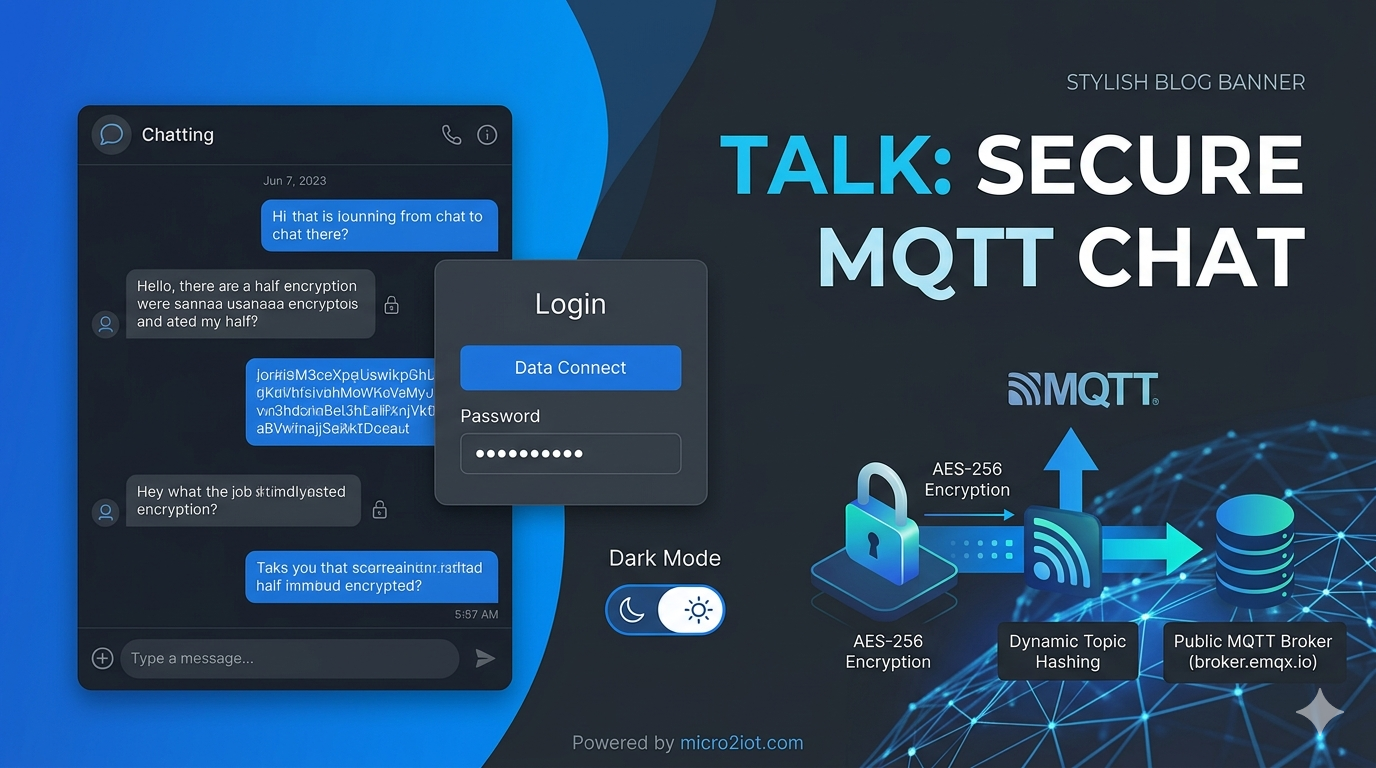
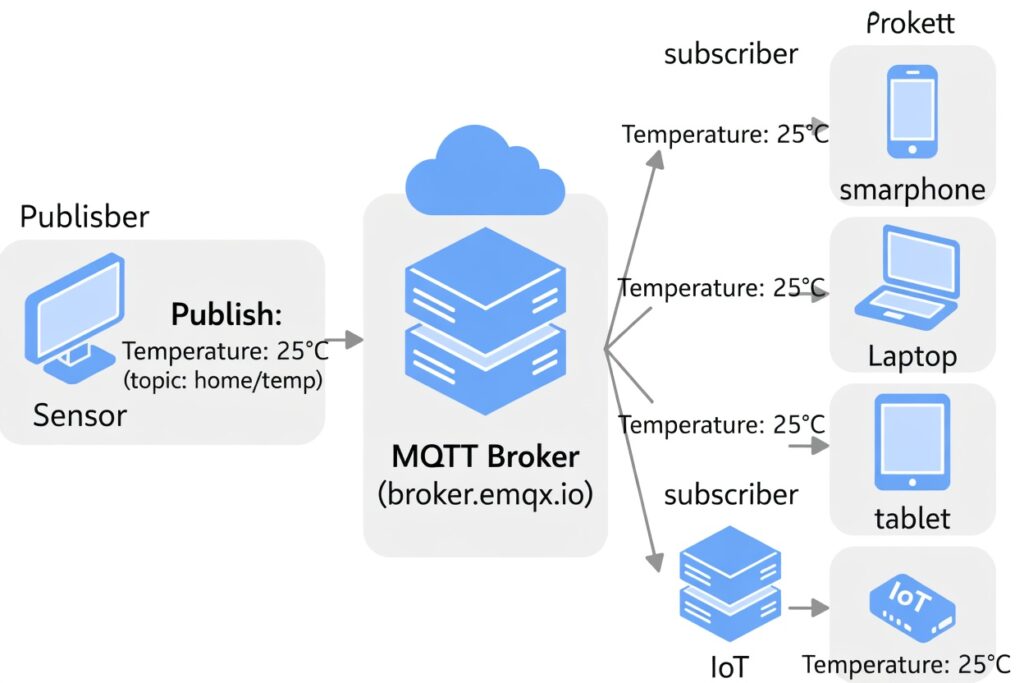
**보안형 MQTT 채팅 프로그램(Talk)**의 주요 기능과 구현 시 고려했던 핵심 보안 사항들입니다.
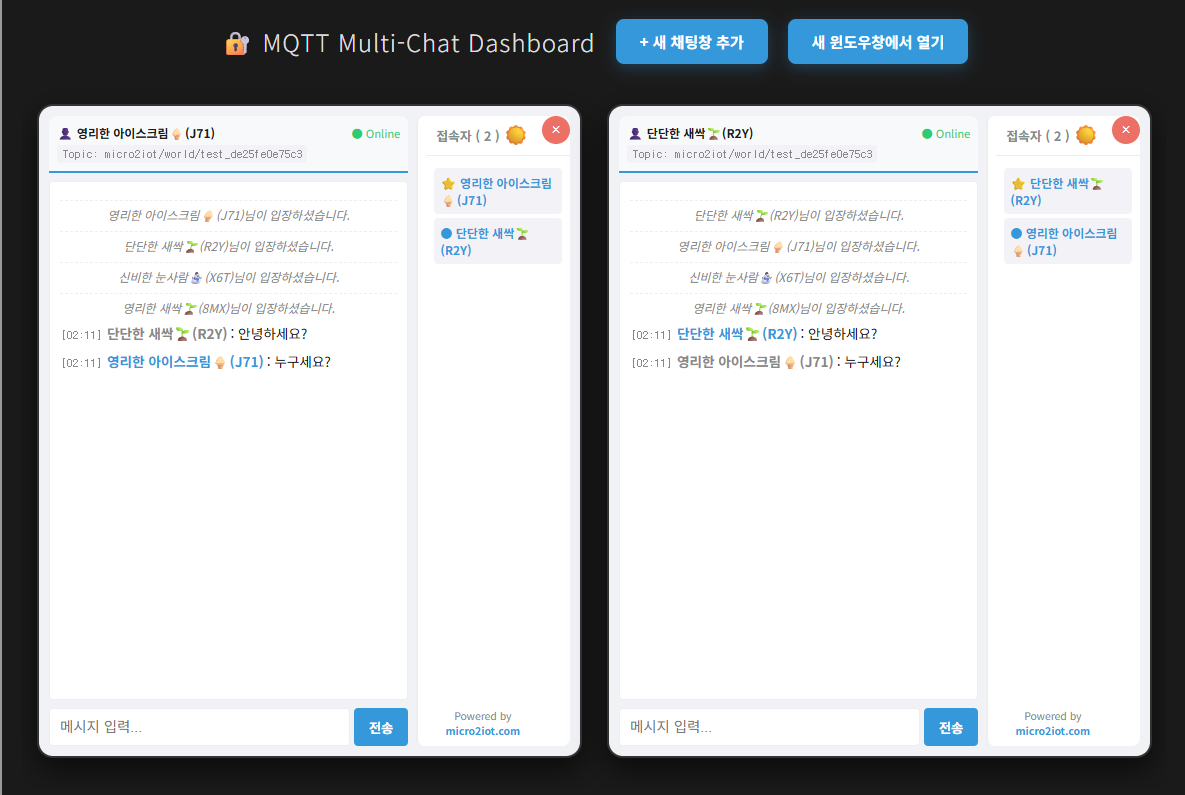
아래에서 직접 실행해 보기
🛠️ 주요 기능 요약
| 구분 | 기능 명칭 | 상세 내용 |
| 접속 제어 | Web-based Login | prompt 대신 웹 UI를 통해 암호 키를 입력받아 보안성과 사용자 편의성 동시 확보 |
| 통신 보안 | End-to-End Encryption | CryptoJS를 이용해 메시지를 AES-256 방식으로 암호화하여 전송 |
| 경로 은닉 | Dynamic Topic Hashing | 암호 키를 SHA-256으로 해싱하여 고유한 토픽(data_...) 생성 |
| 익명성 | Auto Nickname | 형용사와 명사 조합에 랜덤 ID를 붙여 사용자 익명성 보장 (예: 다정한 피자) |
| 안정성 | Auto Reconnect | 연결이 끊겼을 때 3초 후 자동으로 재연결을 시도하는 로직 포함 |
| 리소스 | Local Library | 외부 CDN 의존도를 낮추기 위해 JS 파일을 서버 로컬 경로로 설정 |
🔐 구현 시 고려했던 핵심 보안 사항
1. 데이터 평문 노출 차단 (AES-256 암호화)
공용 MQTT 브로커(EMQX)를 사용하면 누군가 토픽을 구독하여 대화 내용을 가로챌 수 있다는 점이 가장 큰 위협이었습니다.
- 해결: 메시지가 브라우저를 떠나기 전 암호화하고, 받는 쪽에서만 복호화하게 하여 브로커 관리자조차 내용을 알 수 없게 설계했습니다.
- 데이터 타입 변경: 메시지 유형을
chat이 아닌 일반적인string으로 정의하여 MQTT Explorer 상에서도 일반 데이터 스트림처럼 보이게 위장했습니다.
2. 대화방 경로의 기밀성 (SHA-256 토픽 생성)
고정된 토픽 주소를 사용하면 누군가 지속적으로 모니터링할 위험이 있었습니다.
- 해결: 사용자가 입력한 비밀번호를 그대로 토픽으로 쓰지 않고, **해시값(Hash)**으로 변환하여 사용했습니다.
- 효과: 비밀번호를 모르는 사람은 우리가 어느 방(Topic)에서 대화하는지 경로조차 유추할 수 없습니다.
3. 클라이언트 사이드 보안 (Memory-only Key)
비밀번호를 소스 코드에 저장하거나 하드코딩하면 보안이 무의미해집니다.
- 해결:
SECRET_KEY를 브라우저의 변수(메모리)에만 저장하고 페이지를 새로고침하거나 닫으면 즉시 삭제되도록 구현했습니다. - 로컬 라이브러리: 스크립트 파일을 본인 서버(
micro2iot.com)에서 불러오게 하여, 외부 서버 해킹을 통한 스크립트 변조(XSS 공격) 가능성을 차단했습니다.
4. 사후 흔적 제거 (Will Message & No History)
- 유언 메시지(Last Will): 사용자가 비정상적으로 종료되었을 때 브로커가 자동으로 퇴장 메시지를 보내도록 설정하여 세션 관리를 깔끔하게 했습니다.
- 기록 비저장: 별도의 데이터베이스를 두지 않아, 브라우저를 닫는 순간 모든 대화 기록이 휘발되어 물리적인 증거가 남지 않습니다.
HTML chat.html
<!DOCTYPE html>
<html lang="ko">
<head>
<meta charset="UTF-8" />
<meta name="viewport" content="width=device-width, initial-scale=1.0, maximum-scale=1.0, user-scalable=no" />
<title>Talk - Secure MQTT Chat</title>
<link rel="icon" type="image/webp" href="favicon.webp" />
<script src="mqttws31.min.js"></script>
<script src="crypto-js.min.js"></script>
<style>
:root {
--bg-color: #f0f2f5;
--container-bg: #ffffff;
--text-color: #1c1c1e;
--msg-other-bg: #f2f2f7;
--msg-my-bg: #3498db;
--msg-my-text: #ffffff;
--header-bg: #f8f9fa;
--input-bg: #ffffff;
--border-color: #eee;
--sb-track: #f0f2f5;
--sb-thumb: #ccc;
}
[data-theme='dark'] {
--bg-color: #121212;
--container-bg: #1e1e1e;
--text-color: #e0e0e0;
--msg-other-bg: #2c2c2e;
--msg-my-bg: #2980b9;
--msg-my-text: #ffffff;
--header-bg: #000000;
--input-bg: #2c2c2e;
--border-color: #38383a;
--sb-track: #1e1e1e;
--sb-thumb: #444;
}
* {
box-sizing: border-box;
transition: background 0.3s, color 0.1s;
}
body {
margin: 0;
padding: 10px;
font-family: sans-serif;
display: flex;
height: 100vh;
background: var(--bg-color);
gap: 8px;
overflow: hidden;
color: var(--text-color);
}
#main-chat {
flex: 3;
display: flex;
flex-direction: column;
min-width: 0;
}
#user-list-panel {
flex: 1.2;
border-left: 2px solid var(--border-color);
padding-left: 8px;
background: var(--container-bg);
font-size: 0.8rem;
overflow-y: auto;
border-radius: 8px;
}
.theme-switch {
position: fixed;
top: 6px;
right: 35px;
z-index: 1001;
cursor: pointer;
font-size: 20px;
background: none;
border: none;
}
#status-bar {
font-size: 0.75rem;
padding: 8px;
border-bottom: 2px solid var(--msg-my-bg);
display: flex;
flex-direction: column;
gap: 4px;
background: var(--header-bg);
border-radius: 8px 8px 0 0;
}
.status-line {
display: flex;
justify-content: space-between;
align-items: center;
}
.topic-info {
color: #888;
font-family: monospace;
background: var(--msg-other-bg);
padding: 2px 5px;
border-radius: 3px;
font-size: 0.7rem;
}
#chat-box {
flex: 1;
overflow-y: auto;
margin: 8px 0;
padding: 10px;
font-size: 0.85rem;
background: var(--container-bg);
border: 1px solid var(--border-color);
border-radius: 4px;
}
#chat-box::-webkit-scrollbar {
width: 6px;
}
#chat-box::-webkit-scrollbar-thumb {
background: var(--sb-thumb);
border-radius: 10px;
}
.msg-row {
margin-bottom: 8px;
word-break: break-all;
line-height: 1.4;
}
.msg-time {
font-size: 0.7rem;
color: #888;
margin-right: 5px;
font-family: monospace;
}
.msg-user {
font-weight: bold;
margin-right: 3px;
}
.sys-msg {
color: #888;
font-style: italic;
font-size: 0.75rem;
text-align: center;
margin: 8px 0;
border-top: 1px dashed var(--border-color);
padding-top: 5px;
}
.input-area {
display: flex;
gap: 4px;
}
input {
flex: 1;
padding: 10px;
border: 1px solid var(--border-color);
border-radius: 4px;
font-size: 0.9rem;
outline: none;
background: var(--input-bg);
color: var(--text-color);
}
button {
padding: 8px 15px;
background: var(--msg-my-bg);
color: white;
border: none;
border-radius: 4px;
cursor: pointer;
font-weight: bold;
}
#loginOverlay {
position: fixed;
top: 0;
left: 0;
width: 100%;
height: 100%;
background: var(--bg-color);
display: flex;
justify-content: center;
align-items: center;
z-index: 1000;
}
.login-box {
background: var(--container-bg);
padding: 30px;
border-radius: 15px;
box-shadow: 0 8px 24px rgba(0, 0, 0, 0.2);
width: 340px;
text-align: center;
}
.info-box {
font-size: 11px;
color: #888;
background: var(--msg-other-bg);
padding: 10px;
border-radius: 8px;
margin-bottom: 15px;
text-align: left;
line-height: 1.5;
}
.login-label {
display: block;
text-align: left;
font-size: 0.75rem;
margin: 10px 0 3px 2px;
color: #7f8c8d;
font-weight: bold;
}
.user-item {
padding: 6px;
margin: 4px 0;
border-radius: 4px;
background: var(--msg-other-bg);
color: var(--msg-my-bg);
font-weight: bold;
font-size: 0.75rem;
}
/* 요청하신 Footer 스타일 적용 */
.footer-msg {
position: fixed;
bottom: 18px;
right: 60px;
font-size: 0.65rem;
color: #888;
text-align: center;
z-index: 999;
}
.footer-msg a {
color: var(--msg-my-bg);
text-decoration: none;
font-weight: bold;
display: block;
}
</style>
</head>
<body>
<button class="theme-switch" onclick="toggleTheme()">☀️</button>
<div id="loginOverlay">
<div class="login-box">
<h2 style="margin-top: 0; color: var(--msg-my-bg)">Secure Connect</h2>
<div class="info-box">
🇰🇷
<b>같은 비밀번호</b>
로 접속하면 같은 방에서 대화할 수 있습니다.
<br />
🇺🇸 Users with the
<b>same password</b>
enter the same room.
</div>
<span class="login-label">Nickname (대화명)</span>
<input type="text" id="nickInput" style="margin-bottom: 10px; width: 100%" placeholder="대화명 입력..." />
<span class="login-label">Password (비밀번호)</span>
<input type="password" id="passInput" value="public_chat" style="width: 100%" placeholder="비밀번호 입력..." onkeypress="if(event.keyCode==13) enterChat()" />
<button onclick="enterChat()" style="width: 100%; margin-top: 15px; height: 45px">접속하기</button>
</div>
</div>
<div id="main-chat">
<div id="status-bar">
<div class="status-line">
<span id="user-display" style="font-weight: bold">연결 중...</span>
<span id="net-stat" style="color: #e74c3c; font-size: 0.7rem">● Offline</span>
</div>
<div class="status-line">
<span id="topic-display" class="topic-info">Topic: Waiting...</span>
</div>
</div>
<div id="chat-box"></div>
<div class="input-area">
<input type="text" id="msg-input" placeholder="메시지 입력..." onkeypress="if(event.keyCode==13) send()" />
<button onclick="send()">전송</button>
</div>
</div>
<div id="user-list-panel">
<div style="padding: 10px; border-bottom: 1px solid var(--border-color)">
<strong style="color: #7f8c8d">
접속자 (
<span id="user-count">0</span>
)
</strong>
</div>
<div id="user-list" style="padding: 8px"></div>
</div>
<div class="footer-msg">
Powered by
<a href="https://micro2iot.com" target="_blank">micro2iot.com</a>
</div>
<script>
let client, SECRET_KEY, MQTT_TOPIC, myFullId;
let activeUsers = {};
const chatBox = document.getElementById('chat-box');
function generateRandomNick() {
const adjs = ['빛나는', '빠른', '다정한', '용감한', '영리한', '포근한', '단단한', '즐거운', '신비한', '행복한'];
const nouns = ['돌고래🐬', '강아지🐶', '새싹🌱', '우주선🚀', '컴퓨터💻', '아이스크림🍦', '피자🍕', '눈사람⛄', '고양이🐱', '무지개🌈'];
return `${adjs[Math.floor(Math.random() * adjs.length)]} ${nouns[Math.floor(Math.random() * nouns.length)]}`;
}
function setCookie(n, v, d) {
let date = new Date();
date.setTime(date.getTime() + d * 24 * 60 * 60 * 1000);
document.cookie = n + '=' + v + ';expires=' + date.toUTCString() + ';path=/';
}
function getCookie(n) {
let v = '; ' + document.cookie;
let p = v.split('; ' + n + '=');
if (p.length === 2) return p.pop().split(';').shift();
}
function applyTheme(t) {
const b = document.documentElement;
const btn = document.querySelector('.theme-switch');
if (t === 'dark') {
b.setAttribute('data-theme', 'dark');
btn.innerText = '🌙';
} else {
b.removeAttribute('data-theme');
btn.innerText = '☀️';
}
}
function toggleTheme() {
const t = document.documentElement.getAttribute('data-theme') === 'dark' ? 'light' : 'dark';
applyTheme(t);
setCookie('user_theme', t, 30);
}
function enterChat() {
SECRET_KEY = document.getElementById('passInput').value.trim();
let inputNick = document.getElementById('nickInput').value.trim();
if (!SECRET_KEY || !inputNick) return alert('정보를 입력하세요.');
const randomSuffix = Math.random().toString(36).substring(2, 5).toUpperCase();
myFullId = `${inputNick}(${randomSuffix})`;
const hash = CryptoJS.SHA256(SECRET_KEY).toString().substring(0, 12);
MQTT_TOPIC = `micro2iot/world/test_${hash}`;
document.getElementById('loginOverlay').style.display = 'none';
document.getElementById('user-display').innerText = `👤 ${myFullId}`;
document.getElementById('topic-display').innerText = `Topic: ${MQTT_TOPIC}`;
startMqtt();
}
function startMqtt() {
client = new Paho.MQTT.Client('broker.emqx.io', 8084, `cl_${Math.random().toString(36).substring(2, 10)}`);
client.onMessageArrived = (msg) => {
const data = JSON.parse(msg.payloadString);
if (data.type === 'chat') {
try {
const bytes = CryptoJS.AES.decrypt(data.text, SECRET_KEY);
const originalText = bytes.toString(CryptoJS.enc.Utf8);
if (!originalText) return;
const isMe = data.user === myFullId;
const timeStr = new Date().toLocaleTimeString('ko-KR', { hour12: false, hour: '2-digit', minute: '2-digit' });
const div = document.createElement('div');
div.className = 'msg-row';
div.innerHTML = `<span class="msg-time">[${timeStr}]</span><span class="msg-user" style="color:${isMe ? 'var(--msg-my-bg)' : '#888'};">${
data.user
}</span>: ${originalText}`;
chatBox.appendChild(div);
} catch (e) {
console.error('Decryption error');
}
} else if (data.type === 'presence') {
if (!activeUsers[data.user]) appendSystemMsg(`${data.user}님이 입장하셨습니다.`);
activeUsers[data.user] = Date.now();
renderUserList();
} else if (data.type === 'leave') {
if (activeUsers[data.user]) {
delete activeUsers[data.user];
appendSystemMsg(`${data.user}님이 퇴장하셨습니다.`);
renderUserList();
}
}
chatBox.scrollTop = chatBox.scrollHeight;
};
const connOpt = {
useSSL: true,
onSuccess: () => {
client.subscribe(MQTT_TOPIC);
document.getElementById('net-stat').innerText = '● Online';
document.getElementById('net-stat').style.color = '#2ecc71';
sendPresence();
setInterval(sendPresence, 5000);
},
onFailure: () => setTimeout(startMqtt, 5000),
willMessage: new Paho.MQTT.Message(JSON.stringify({ type: 'leave', user: myFullId })),
};
connOpt.willMessage.destinationName = MQTT_TOPIC;
client.connect(connOpt);
}
function send() {
const input = document.getElementById('msg-input');
if (!input.value.trim() || !client.isConnected()) return;
const encrypted = CryptoJS.AES.encrypt(input.value, SECRET_KEY).toString();
const msg = new Paho.MQTT.Message(JSON.stringify({ type: 'chat', user: myFullId, text: encrypted }));
msg.destinationName = MQTT_TOPIC;
client.send(msg);
input.value = '';
input.focus();
}
function sendPresence() {
if (!client || !client.isConnected()) return;
const msg = new Paho.MQTT.Message(JSON.stringify({ type: 'presence', user: myFullId }));
msg.destinationName = MQTT_TOPIC;
client.send(msg);
}
function appendSystemMsg(text) {
const div = document.createElement('div');
div.className = 'sys-msg';
div.innerText = text;
chatBox.appendChild(div);
}
function renderUserList() {
const listDiv = document.getElementById('user-list');
const now = Date.now();
listDiv.innerHTML = '';
let count = 0;
for (let user in activeUsers) {
if (now - activeUsers[user] < 12000) {
const uDiv = document.createElement('div');
uDiv.className = 'user-item';
uDiv.innerText = (user === myFullId ? '⭐ ' : '● ') + user;
listDiv.appendChild(uDiv);
count++;
}
}
document.getElementById('user-count').innerText = count;
}
window.onload = () => {
const savedTheme = getCookie('user_theme');
if (savedTheme) applyTheme(savedTheme);
document.getElementById('nickInput').value = generateRandomNick();
document.getElementById('passInput').focus();
};
</script>
</body>
</html>
답글 남기기